
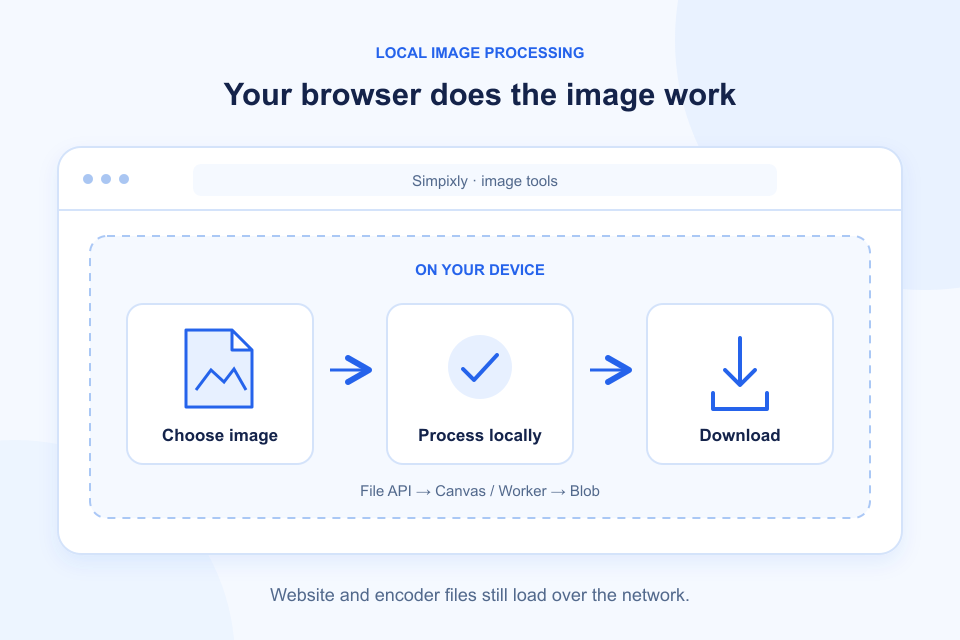
Many online image tools ask you to upload a file before processing it.
But not every image tool needs to send your image to a remote server.
Modern web browsers can perform many image-processing tasks directly on your device.
This approach is commonly called browser-based or client-side image processing.
It can offer a useful alternative to traditional upload-based workflows, particularly when privacy and convenience matter.
Let's look at how it works.
1. What Is Browser-Based Image Processing?
Browser-based image processing means that an image is handled using technologies running inside your web browser.
Instead of sending the original file to a remote processing server, a website can use browser capabilities to read and process the selected image locally.
Common browser technologies include:
- JavaScript.
- File API.
- Canvas API.
- Web Workers.
- WebAssembly.
These technologies can be used together to build image compression, resizing and conversion tools.
The exact implementation depends on the application.
2. How Does Local Image Processing Work?
A simplified browser-based workflow looks like this:
Step 1: Select an image
You choose an image from your device using the browser's file picker.
The browser provides the website with access to the selected file through its file-handling APIs.
Step 2: Read the image
The application reads the image data and prepares it for processing.
Step 3: Process the image
JavaScript, Canvas or other browser technologies can be used to resize, compress or transform the image.
Some applications use WebAssembly for additional processing capabilities.
Step 4: Generate the result
The browser creates an output image in the requested format.
Step 5: Download the file
The resulting file can be made available for download without requiring a server to store the original image.
This is a simplified explanation. Actual applications may use different combinations of browser technologies.
3. Local Processing vs Server-Based Processing
There are two common approaches to online image processing.
Local Browser Processing
With local processing, the image is handled on the user's device.
Potential advantages include:
- The original image does not need to be uploaded to a processing server.
- Processing can work without a dedicated image-processing backend.
- Users can avoid sending image files to remote services.
- Some operations can continue without a network connection after the application has loaded, depending on implementation.
However, local processing depends on the user's device and browser.
Very large images may require substantial memory and processing power.
Server-Based Processing
With server-based processing, the image is uploaded to a remote server.
The server performs the requested operation and returns the processed image.
Potential advantages include:
- Access to more powerful server resources.
- Consistent processing environments.
- Support for operations that may be difficult to run efficiently in a browser.
However, uploading images introduces additional privacy considerations.
Users should understand how their files are transmitted, processed, stored and deleted.
4. Does Browser-Based Processing Mean an Image Is Always Private?
Not automatically.
This is an important distinction.
A website may process an image locally while still using analytics, advertising scripts, cookies or other third-party services.
Likewise, a website may load images or other resources from external servers.
Therefore, browser-based processing does not automatically mean that a website collects no data or performs no tracking.
When evaluating an image tool, consider:
- Whether the original image is uploaded.
- Whether third-party services can access image data.
- Whether analytics or advertising technologies are used.
- What information is collected.
- Whether temporary files are stored.
- Whether the privacy policy clearly explains the process.
A trustworthy privacy statement should describe what actually happens, rather than relying on broad marketing promises.
5. What Are the Limitations of Local Processing?
Local processing has advantages, but it is not suitable for every situation.
Device performance
Image processing uses the memory and processing power of the user's device.
Older devices may take longer to process large images.
Browser compatibility
Some browser APIs and advanced image features may not be supported consistently across every browser.
Memory usage
Large images can consume significant memory, especially when several images are processed simultaneously.
Complex processing tasks
Some advanced operations may require more resources or specialized software than a browser can efficiently provide.
The right approach depends on the tool's intended functionality.
6. How to Choose a Privacy-Focused Image Tool
Before using an online image tool, look for clear answers to a few questions:
- Does the tool upload the original image?
- Where does image processing happen?
- Does the service store uploaded files?
- Are third-party analytics or advertising services used?
- Is there a clear privacy policy?
- Are supported formats and processing limitations explained?
Do not assume that every tool described as browser-based has identical privacy protections.
Look for transparent technical explanations.
7. Browser-Based Image Tools at Simpixly
Simpixly uses the browser File API to inspect and decode a selected image. Its compressor, resizer and converter draw decoded pixels to Canvas or OffscreenCanvas and generate the output locally. When supported, a Web Worker performs the operation; otherwise it falls back to the main browser thread. A locally bundled WebAssembly encoder can provide WebP export when native encoding is unavailable.
The application image tools do not upload selected files, generated pixels, filenames or embedded metadata to an image-processing server. Download links refer to locally generated Blobs. Clearing or leaving the tool releases image references, subject to browser memory and download handling; files you download remain where you save them. The application does not intentionally persist images in browser storage.
The current tools accept one static JPG, PNG or WebP up to 20 MB, 8192 pixels per side and 16 megapixels. They do not support animation, batch processing or cropping. No account is required.
Loading the website and its bundled encoder still requires normal static-file requests. The application currently does not enable analytics, advertising or non-essential application cookies, but this is not a blanket no-tracking claim about every hosting or security service. See the Privacy Policy for the distinction between image processing, website requests and provider disclosures.
For a separate discussion of evaluating services and exported metadata, read Are Online Image Compressors Safe?.
Frequently Asked Questions
Can a browser compress images without uploading them?
Yes. Browser technologies can read and process selected image files locally. Whether a particular website does this depends on its implementation.
Is local image processing faster than server processing?
It depends on the image, device, browser and processing method. Local processing avoids an upload and download round trip, but a slower device may take longer to complete the operation.
Can browser-based image processing work offline?
Some browser-based tools can process an already selected image after the necessary application and encoder resources have loaded. Simpixly does not install an offline cache or promise a fully offline website. Opening an unloaded page or encoder still needs a connection.
Is browser-based image processing more private?
It can reduce the need to transmit original image files to a remote processing server. However, privacy also depends on analytics, third-party scripts, data collection and the website's overall implementation.
Explore Simpixly Image Tools
Explore simple tools for everyday image tasks.